Webform
Customizable Webform
Webform is the preferred method for consumers to contact you with privacy requests
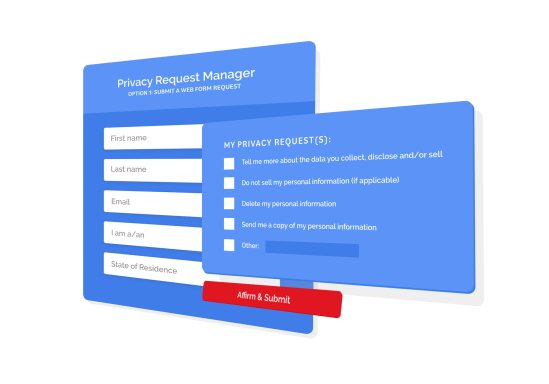
Your first tool for accepting privacy requests should be an interactive webform with everything a consumer needs to submit a request and start your fulfillment workflow. Optacy webform is modern, accessible, and responsive, with two ways to implement it: embedded with all your website styling, or hosted by us.
Hosting a webform
Embed the form on your site or let Optacy host it for you. Both options are included.
1. Embedded option
Easily embed our webform into your website by copying HTML from your dashboard. The webform will automatically pull in your styles and match your website without any code changes. We recommend you embed the form on a new page of your site, and link to it from your footer with text “Do Not Sell or Share My Personal Information.” In order to see the rights in the webform, select a jurisdiction (country and/or state). Our system configures rights by jurisdiction and therefore does not show rights until you select a jurisdiction. See below!
2. Hosted option
Let us host it for you at webform.optacy.com. Link from your homepage footer, privacy policy, or anywhere else. Hosting is reliable and comes at no additional cost.
Publishing the webform on your website
Meet “Do Not Sell or Share” requirements and give consumers a clear path to submit privacy requests.
Do Not Sell or Share My Personal Information
Whether you host the form or we do, link to it from your homepage footer to meet “Do Not Sell or Share My Personal Information” requirements.
Button options
Prefer a button to collect consumer privacy requests? Link either of these styles to your webform:
Customizing the webform
Configure rights with Jurisdiction Rules and add required or optional questions.
- Add or remove questions you need to fulfill a request. First Name, Last Name, Email Address, and I am a (customer, employee, etc.) is the default Form Field Set.
- Add an Optacy upload link to receive documents securely from your requesters.
- Define Jurisdiction Rules and select different rights as checkboxes for consumers.
- Optionally offer a free-text field for users to type privacy requests.
- Automatically brand it by embedding it in your site.
- All forms include reCAPTCHA to block non-human submissions.
Our webform can be edited directly in the dashboard. Need help building it? We offer free platform training, or we can set it up for you for a small fee.
Join the Optacy community today
Have any questions? Call us.
From the US: +1 (855) 5-OPTACY (855-567-8229)
From outside the US: +1 (302) 864-2253